2019年10月

相关资料

https://en.wikipedia.org/wiki/Skip_list

https://www.cnblogs.com/xuqiang/archive/2011/05/22/2053516.html
https://www.iteye.com/blog/dsqiu-1705530
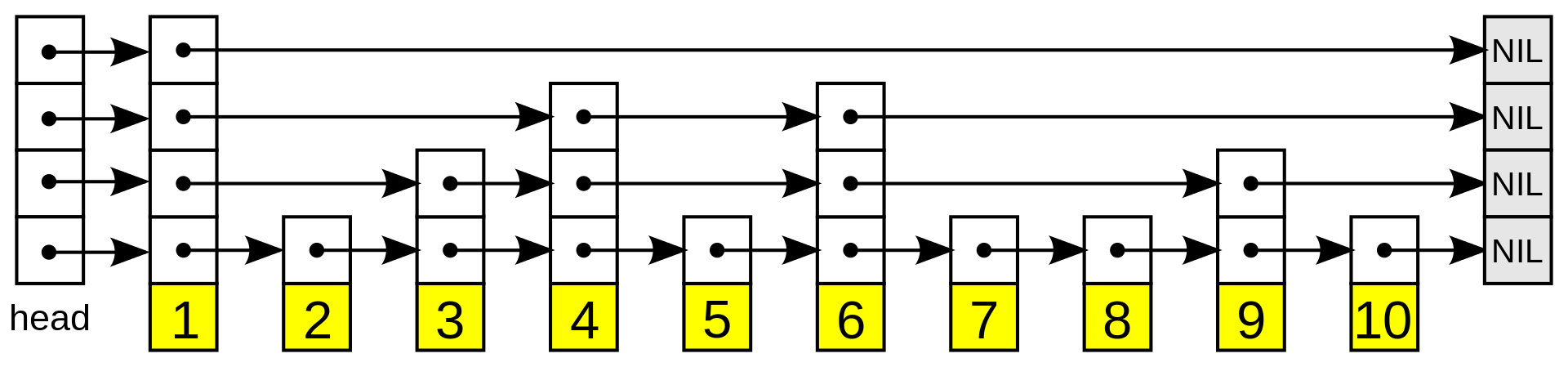
In computer science, a skip list is a data structure that allows O(log n) search complexity as well as O(log n) insertion complexity within an ordered sequence of n elements.

A skip list is built in layers. The bottom layer is an ordinary ordered linked list. Each higher layer acts as an "express lane" for the lists below, where an element in layer i appears in layer i+1 with some fixed probability p (two commonly used values for p are 1/2 or 1/4).

1920px-Skip_list.svg.png

/*
 * 跳表(skip list)
 */
#include <stdio.h>
#include <stdlib.h>

#define MAX_LEVEL 10 //最大层数

struct node
{
    int key;
    int value;
    struct node *forward[];
};
struct skiplist
{
    int level;
    struct node *header;
};

struct node *createnode(int level, int key, int value);
struct skiplist *create();
void insert(struct skiplist *sl, int key, int value);
void del(struct skiplist *sl, int key);
void display(struct skiplist *sl);
int randomLevel();

int main()
{
    int i;
    struct skiplist *sl=create();

    for(i = 0; i < 20; i++)
    {
        insert(sl,i,i*2);
    }
    display(sl);
    
    del(sl,4);
    display(sl);

    return 0;
}

// 创建节点
struct node *createnode(int level, int key, int value)
{
    struct node *slnode = (struct node *)malloc(sizeof(struct node)+level*sizeof(struct node *));
    slnode->key = key;
    slnode->value = value;

    return slnode;
}

struct skiplist *create()
{
    int i;
    struct skiplist *sl = (struct skiplist *)malloc(sizeof(struct skiplist));

    sl->level = 1;
    sl->header = createnode(MAX_LEVEL, -1, -1);

    for(i = 0; i < MAX_LEVEL; i++)
    {
        sl->header->forward[i] = NULL;
    }

    return sl;
}

void insert(struct skiplist *sl, int key, int value)
{
    struct node *update[MAX_LEVEL];
    struct node *x;
    int i, level;

    x = sl->header;
    for(i = sl->level-1; i >= 0; i--)
    {
        while(x->forward[i] && x->forward[i]->key < key)
        {
            x = x->forward[i];
        }
        update[i] = x;
    }

    // key不能重复
    if(x->forward[0] && x->forward[0]->key == key)
    {
        return ;
    }
    
    level = randomLevel();
    if(level > sl->level)
    {
        for(i = sl->level; i < level; i++)
        {
            update[i] = sl->header;
        }
        sl->level = level;
    }
    
    x = createnode(level,key,value);
    for(i = 0; i < level; i++)
    {
        x->forward[i] = update[i]->forward[i];
        update[i]->forward[i] = x;
    }
}

void del(struct skiplist *sl, int key)
{
    struct node *update[MAX_LEVEL];
    struct node *x;
    int i;

    x = sl->header;
    for(i = sl->level-1; i >= 0; i--)
    {
        while(x->forward[i] && x->forward[i]->key < key)
        {
            x = x->forward[i];
        }
        update[i] = x;
    }

    x = x->forward[0];
    if(x && x->key == key)
    {
        for(i = 0; i < sl->level; i++)
        {
            if(update[i]->forward[i] == x)
            {
                update[i]->forward[i] = x->forward[i];
            }
        }
        free(x);

        while(sl->level > 1 && sl->header->forward[sl->level-1] == NULL)
        {
            sl->level--;
        }
    }
}

void display(struct skiplist *sl)
{
    struct node *x;
    int i;
    
    for(i = sl->level-1; i >= 0; i--)
    {
        x = sl->header;
        while(x->forward[i])
        {
            printf("%d -> ",x->value);
            x = x->forward[i];
        }
        printf("%d\n",x->value);
    }
    printf("\n");
}

// 随机产生层数
int randomLevel()
{
    int k = 1;

    while(rand()%2) k++;
    k = (k < MAX_LEVEL) ? k : MAX_LEVEL;

    return k;
}

相关资料

https://en.wikipedia.org/wiki/LZ77_and_LZ78
https://en.wikipedia.org/wiki/DEFLATE
https://en.wikipedia.org/wiki/Lempel%E2%80%93Ziv%E2%80%93Markov_chain_algorithm
https://github.com/lzfse/lzfse

https://en.wikipedia.org/wiki/Zlib
https://en.wikipedia.org/wiki/Snappy_(compression)
https://en.wikipedia.org/wiki/Zip_(file_format)
https://en.wikipedia.org/wiki/Bzip2

https://www.7-zip.org/

LZ77

LZ77 and LZ78 are the two lossless data compression algorithms published in papers by Abraham Lempel and Jacob Ziv in 1977 and 1978.
These two algorithms form the basis for many variations including LZW, LZSS, LZMA and others.

DEFLATE

In computing, Deflate is a lossless data compression algorithm and associated file format that uses a combination of the LZ77 algorithm and Huffman coding.

LZMA

The Lempel–Ziv–Markov chain algorithm (LZMA) is an algorithm used to perform lossless data compression.
This algorithm uses a dictionary compression scheme somewhat similar to the LZ77 algorithm published by Abraham Lempel and Jacob Ziv in 1977 and features a high compression ratio (generally higher than bzip2).

LZFSE

LZFSE is a Lempel-Ziv style data compression algorithm using Finite State Entropy coding. It targets similar compression rates at higher compression and decompression speed compared to deflate using zlib.

zlib

zlib is a software library used for data compression. zlib was written by Jean-loup Gailly and Mark Adler and is an abstraction of the DEFLATE compression algorithm used in their gzip file compression program.
As of September 2018, zlib only supports one algorithm, called DEFLATE, that is a variation of LZ77.

zlib 是一个开源的函数库,是 DEFLATE 算法的一种实现。
该库支持三种数据格式:ZLIB、DEFLATE、GZIP,对应的标准为:rfc1950、rfc1951、rfc1952。
PHP 中对应的方法为:gzcompress、gzdeflate、gzencode。

gzip

gzip is a file format and a software application used for file compression and decompression.
The program was created by Jean-loup Gailly and Mark Adler as a free software replacement for the compress program used in early Unix systems.

gzip is based on the DEFLATE algorithm, which is a combination of LZ77 and Huffman coding.

gzip 是一种数据格式,基于 DEFLATE 算法实现。

Snappy

Snappy is a fast data compression and decompression library written in C++ by Google based on ideas from LZ77 and open-sourced in 2011.
It does not aim for maximum compression, or compatibility with any other compression library; instead, it aims for very high speeds and reasonable compression.

Snappy 追求的不是更大的压缩率,而是更快的压缩速率和合理的压缩率。

Zip

ZIP is an archive file format that supports lossless data compression. A ZIP file may contain one or more files or directories that may have been compressed.
The ZIP file format permits a number of compression algorithms, though DEFLATE is the most common.

Zip 是一种压缩文件格式。

bzip2

bzip2 is a free and open-source file compression program that uses the Burrows–Wheeler algorithm.
bzip2 compresses most files more effectively than the older LZW (.Z) and Deflate (.zip and .gz) compression algorithms, but is considerably slower.
LZMA is generally more space-efficient than bzip2 at the expense of even slower compression speed, while having much faster decompression.

7-Zip

7-Zip works in Windows.

High compression ratio in 7z format with LZMA and LZMA2 compression.

相关资料

https://en.wikipedia.org/wiki/Transport_Layer_Security#Protocol_details
https://en.wikipedia.org/wiki/Cipher_suite

https://www.cnblogs.com/thammer/p/7083660.html
https://blog.csdn.net/mrpre/article/details/77867439

# man ciphers
The TLS protocol comprises two layers: the TLS record and the TLS handshake protocols.
TLS 报文大致分为2部分:TLS record 和 TLS handshake。

TLS record

Content Type: Handshake (22)
Version: TLS 1.0 (0x0301)
Length: 512
# Content type
This field identifies the Record Layer Protocol Type contained in this Record.

Hex    Dec    Type
0x14    20    ChangeCipherSpec
0x15    21    Alert
0x16    22    Handshake
0x17    23    Application
0x18    24    Heartbeat

Handshake protocol

# Message type
This field identifies the handshake message type.

Code    Description
0    HelloRequest
1    ClientHello
2    ServerHello
4    NewSessionTicket
8    EncryptedExtensions (TLS 1.3 only)
11    Certificate
12    ServerKeyExchange
13    CertificateRequest
14    ServerHelloDone
15    CertificateVerify
16    ClientKeyExchange
20    Finished

Alert protocol

This record should normally not be sent during normal handshaking or application exchanges. However, this message can be sent at any time during the handshake and up to the closure of the session. If this is used to signal a fatal error, the session will be closed immediately after sending this record, so this record is used to give a reason for this closure.

握手过程

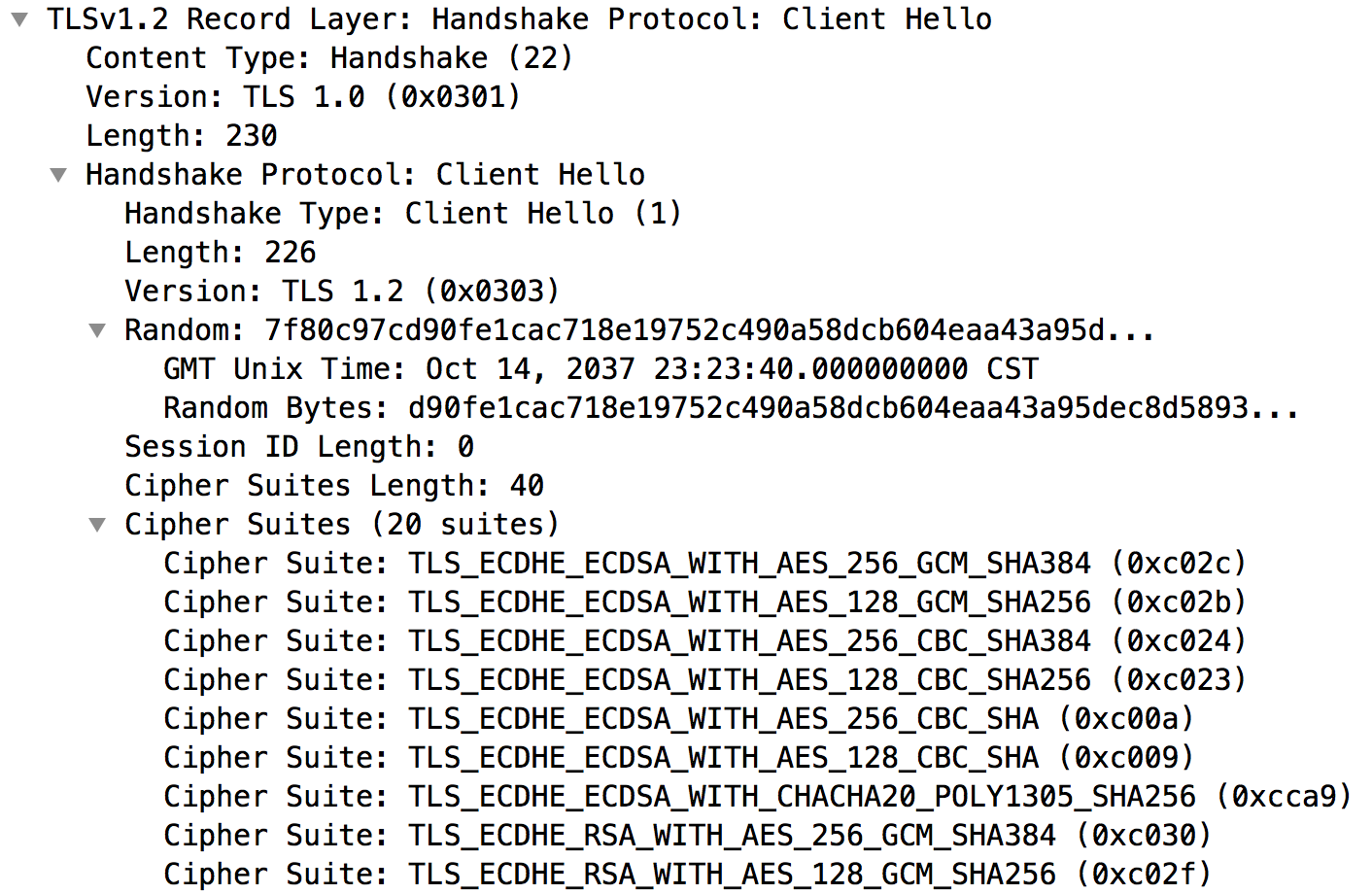
1. A client sends a ClientHello message specifying the highest TLS protocol version it supports, a random number, a list of suggested cipher suites and suggested compression methods.
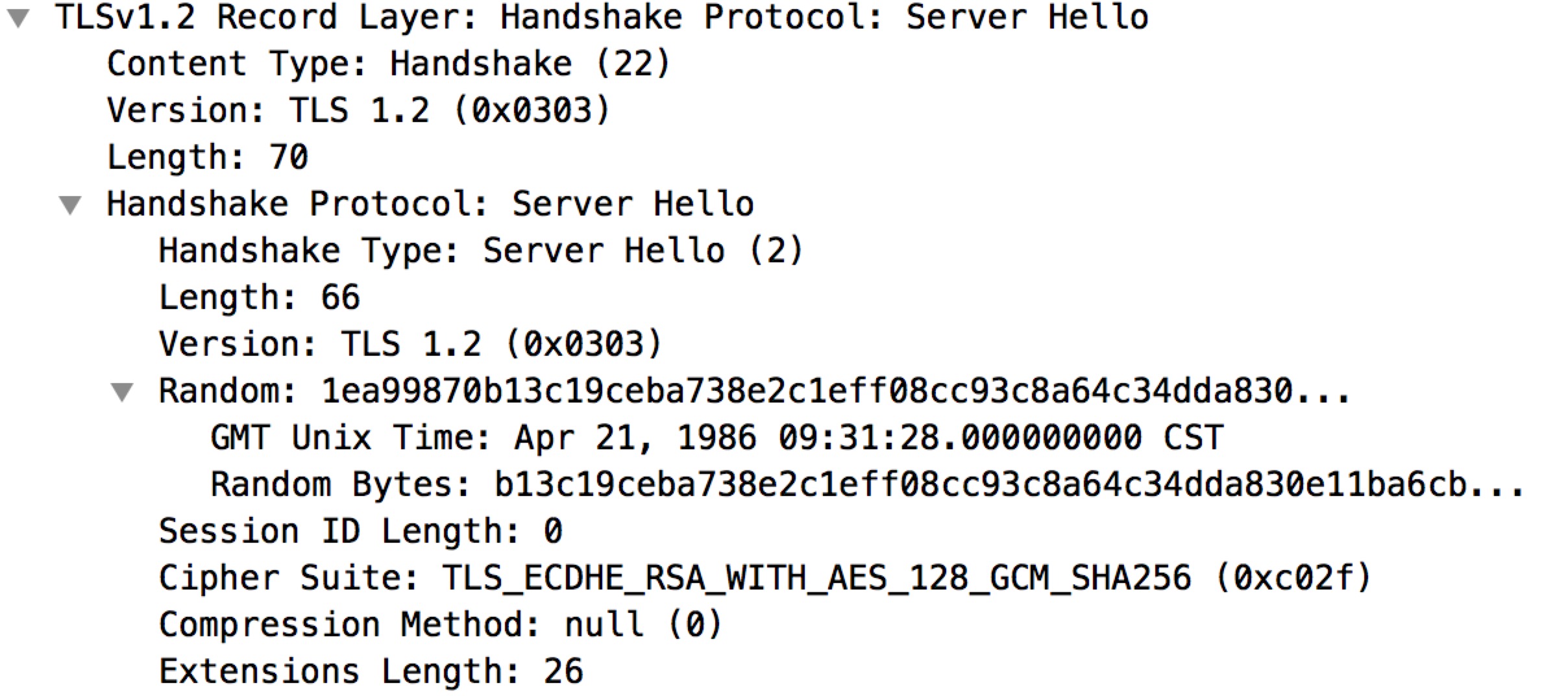
2. The server responds with a ServerHello message, containing the chosen protocol version, a random number, CipherSuite and compression method from the choices offered by the client.
3. The server sends its Certificate message (depending on the selected cipher suite, this may be omitted by the server).
4. The server sends its ServerKeyExchange message (depending on the selected cipher suite, this may be omitted by the server). This message is sent for all DHE and DH_anon ciphersuites.
5. The server sends a ServerHelloDone message, indicating it is done with handshake negotiation.
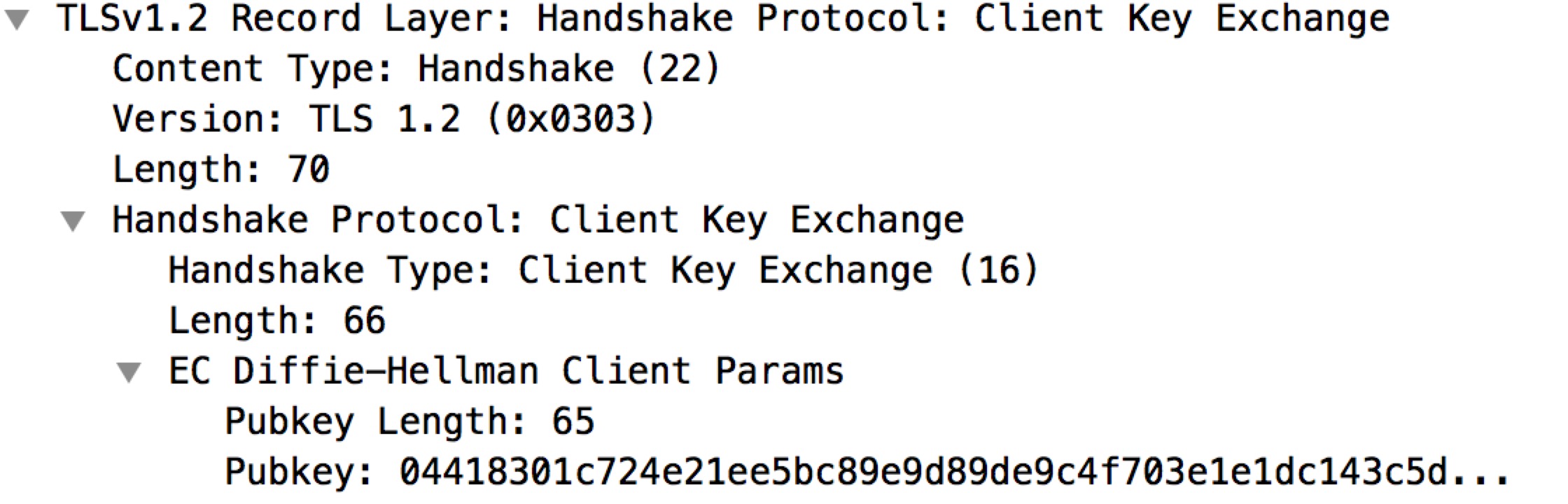
6. The client responds with a ClientKeyExchange message, which may contain a PreMasterSecret, public key, or nothing. (Again, this depends on the selected cipher.) This PreMasterSecret is encrypted using the public key of the server certificate.
7. The client now sends a ChangeCipherSpec record, essentially telling the server, "Everything I tell you from now on will be authenticated (and encrypted if encryption parameters were present in the server certificate)."
8. Finally, the client sends an authenticated and encrypted Finished message, containing a hash and MAC over the previous handshake messages. The server will attempt to decrypt the client's Finished message and verify the hash and MAC.
9. Finally, the server sends a ChangeCipherSpec, telling the client, "Everything I tell you from now on will be authenticated (and encrypted, if encryption was negotiated)."
10. The server sends its authenticated and encrypted Finished message. The client performs the same decryption and verification procedure as the server did in the previous step.
11. Application phase: at this point, the "handshake" is complete and the application protocol is enabled, with content type of 23. Application messages exchanged between client and server will also be authenticated and optionally encrypted exactly like in their Finished message.

113529_b699c0f4_554033.png

ClientHello

113937_3443ce9f_554033.png

ServerHello

202837_5948cad4_554033.jpeg

ServerKeyExchange

201549_34a670a9_554033.jpeg

ClientKeyExchange

201902_388cef06_554033.jpeg

加密套件

A cipher suite is a set of algorithms that help secure a network connection that uses Transport Layer Security (TLS) or its now-deprecated predecessor Secure Socket Layer (SSL).
The set of algorithms that cipher suites usually contain include: a key exchange algorithm, a bulk encryption algorithm, and a message authentication code (MAC) algorithm.

The key exchange algorithm is used to exchange a key between two devices. This key is used to encrypt and decrypt the messages being sent between two machines.
The bulk encryption algorithm is used to encrypt the data being sent.
The MAC algorithm provides data integrity checks to ensure that the data sent does not change in transit.
In addition, cipher suites can include signatures and an authentication algorithm to help authenticate the server and or client.
命名规范:
如:TLS_RSA_WITH_3DES_EDE_CBC_SHA
1. TLS defines the protocol that this cipher suite is for;
2. RSA indicates the key exchange algorithm being used. The key exchange algorithm is used to determine if and how the client and server will authenticate during the handshake.
3. 3DES_EDE_CBC indicates the block cipher being used to encrypt the message stream, together with the block cipher mode of operation.
4. SHA indicates the message authentication algorithm which is used to authenticate a message.
# openssl ciphers -v
详细列出所有加密套件。
相关资料

https://en.wikipedia.org/wiki/X.509
https://segmentfault.com/q/1010000007085150

# man x509
In cryptography, X.509 is a standard that defines the format of public key certificates.

X.509是由国际电信联盟(ITU-T)制定的数字证书格式标准。

Certificate filename extensions

There are several commonly used filename extensions for X.509 certificates. Unfortunately, some of these extensions are also used for other data such as private keys.

.pem – Base64 encoded DER certificate, enclosed between "-----BEGIN CERTIFICATE-----" and "-----END CERTIFICATE-----".
.cer, .crt, .der – usually in binary DER form.

证书结构

The structure foreseen by the standards is expressed in a formal language, Abstract Syntax Notation One (ASN.1).

The structure of an X.509 v3 digital certificate is as follows:

Certificate
    Version Number                              // 版本号
    Serial Number                               // 序列号(证书唯一标识符)
    Signature Algorithm ID
    Issuer Name                                 // 签发机构
    Validity period                             // 有效期
        Not Before
        Not After
    Subject name                                // 证书主体(证书持有者)
    Subject Public Key Info                     // 公钥信息
        Public Key Algorithm                    // 公钥算法
        Subject Public Key                      // 公钥
    Issuer Unique Identifier (optional)
    Subject Unique Identifier (optional)
    Extensions (optional)
        ...
    Certificate Signature Algorithm             // 证书签名算法
    Certificate Signature                       // 证书签名
证书签名用来保证证书的完整性。

x509

The x509 command is a multi purpose certificate utility.

It can be used to display certificate information, convert certificates to various forms, sign certificate requests like a "mini CA" or edit certificate trust settings.
# -signkey filename
this option causes the input file to be self signed using the supplied private key.

# -req
by default a certificate is expected on input. With this option a certificate request is expected instead.

# -set_serial n
specifies the serial number to use.

# -CA filename
specifies the CA certificate to be used for signing.

# -CAkey filename
sets the CA private key to sign a certificate with.

# -CAcreateserial
with this option the CA serial number file is created if it does not exist.

# -extfile filename
file containing certificate extensions to use. If not specified then no extensions are added to the certificate.

# -extensions section
the section to add certificate extensions from.
# openssl genrsa -out server.key 2048 // 生成私钥
# openssl req -new -key server.key -out server.csr // 生成证书签名请求
# openssl x509 -req -days 365 -in server.csr -signkey server.key -out server.crt // 生成自签名证书
# openssl x509 -in server.crt -text -noout // 查看证书内容

自签名证书

# openssl genrsa -out server.key 2048
# openssl req -new -key server.key -out server.csr
# openssl x509 -req -days 365 -in server.csr -signkey server.key -out server.crt

CA签名证书

// 生成CA证书
# openssl genrsa -out ca.key 2048
# openssl req -new -key ca.key -x509 -days 365 -out ca.crt

// 生成CA签名证书
# openssl genrsa -out server.key 2048
# openssl req -new -key server.key -out server.csr
# openssl x509 -req -days 365 -in server.csr -CA ca.crt -CAkey ca.key -set_serial 01 -out server.crt

相关资料

https://en.wikipedia.org/wiki/Certificate_signing_request
https://www.sslshopper.com/what-is-a-csr-certificate-signing-request.html
https://www.openssl.org/docs/manmaster/man1/req.html

# man req
In Public Key Infrastructure (PKI) systems, a Certificate Signing Request is a message sent from an applicant to a Certificate Authority in order to apply for a digital identity certificate.

It usually contains the public key for which the certificate should be issued, identifying information (such as a domain name) and integrity protection (e.g., a digital signature).

The most common format for CSRs is the PKCS #10 specification.
A CSR or Certificate Signing request is a block of encoded text that is given to a Certificate Authority when applying for an SSL Certificate.
It is usually generated on the server where the certificate will be installed and contains information that will be included in the certificate such as the organization name, common name (domain name), locality, and country.
It also contains the public key that will be included in the certificate. A private key is usually created at the same time that you create the CSR, making a key pair.

A certificate authority will use a CSR to create your SSL certificate, but it does not need your private key. You need to keep your private key secret.
The certificate created with a particular CSR will only work with the private key that was generated with it. So if you lose the private key, the certificate will no longer work.
格式:
Country Name (2 letter code) [XX]: 国家
State or Province Name: 省/市
Locality Name (eg, city) [Default City]: 城市
Organization Name (eg, company) [Default Company Ltd]: 组织机构
Organizational Unit Name (eg, section): 机构部门
Common Name (eg, your name or your server's hostname): 通用名
Email Address: 邮箱地址

req

The req command primarily creates and processes certificate requests in PKCS#10 format.

It can additionally create self signed certificates for use as root CAs for example.
# -new
this option generates a new certificate request.

# -key filename
This specifies the file to read the private key from.

# -in filename
This specifies the input filename to read a request from or standard input if this option is not specified.
A request is only read if the creation options (-new and -newkey) are not specified.

# -out filename
This specifies the output filename to write to or standard output by default.

# -text
prints out the certificate request in text form.

# -noout
this option prevents output of the encoded version of the request.

# -verify
verifies the signature on the request.

# -x509
this option outputs a self signed certificate instead of a certificate request.
This is typically used to generate a test certificate or a self signed root CA.

# -days n
when the -x509 option is being used this specifies the number of days to certify the certificate for.
The default is 30 days.
# openssl genrsa -out server.key 2048 // 生成私钥
# openssl req -new -key server.key -out server.csr // 生成证书签名请求
# openssl req -in server.csr -text -noout // 查看证书签名请求
# openssl req -verify -in server.csr -noout // 校验证书签名请求
# openssl req -new -key server.key -x509 -days 365 -out ca.crt // 生成CA证书
注意:此为证书,不是签名请求。

相关资料

https://en.wikipedia.org/wiki/Public-key_cryptography
https://en.wikipedia.org/wiki/Digital_signature

# man genrsa
# man rsa
# man pkcs8
# man dgst
公钥加密:public key encryption
Public-key cryptography, or asymmetric cryptography, is a cryptographic system that uses pairs of keys: public keys which may be disseminated widely, and private keys which are known only to the owner.
This accomplishes two functions: authentication, which is when the public key is used to verify that a holder of the paired private key sent the message, and encryption, whereby only the holder of the paired private key can decrypt the message encrypted with the public key.

RSA

RSA 算法规定:
明文长度不能超过密钥长度 - 11(单位:字节)。
密文长度正好等于密钥长度。

如果密钥长度为1024位,则:
明文长度最大为117字节。
密文长度为128字节。

genrsa

The genrsa command generates an RSA private key.

rsa

The rsa command processes RSA keys. They can be converted between various forms and their components printed out.

pkcs8

The pkcs8 command processes private keys in PKCS#8 format.
# openssl genrsa -out rsa_private_key.pem 1024 // 生成 RSA 私钥
# openssl rsa -in rsa_private_key.pem -pubout -out rsa_public_key.pem // 生成 RSA 公钥
# openssl pkcs8 -topk8 -in rsa_private_key.pem -nocrypt -out pkcs8_private_key.pem // 将 RSA 私钥转换成 PKCS8 格式
# openssl rsa -in rsa_private_key.pem -noout -text // 查看私钥明细
# openssl rsa -in rsa_public_key.pem -pubin -noout -text // 查看公钥明细

公钥加密(Public Key Encryption)

Public key encryption, in which a message is encrypted with a recipient's public key. The message cannot be decrypted by anyone who does not possess the matching private key.
公钥加密,私钥解密。

# openssl rsautl -encrypt -in test.txt -out test.enc -inkey rsa_public_key.pem -pubin // 公钥加密
# openssl rsautl -decrypt -in test.enc -out test.dec -inkey rsa_private_key.pem // 私钥解密

数字签名(Digital signature)

A digital signature is a mathematical scheme for verifying the authenticity of digital messages or documents.

A valid digital signature gives a recipient very strong reason to believe that the message was created by a known sender (authentication), that the sender cannot deny having sent the message (non-repudiation), and that the message was not altered in transit (integrity).
私钥签名,公钥验证。

# openssl rsautl -sign -in test.txt -inkey rsa_private_key.pem -out test.sign // 私钥签名
# openssl rsautl -verify -in test.sign -inkey rsa_public_key.pem -pubin // 公钥验证
散列签名
签名方案用于消息的散列值,而不是消息本身。

# openssl dgst -sign rsa_private_key.pem -sha1 -out test.sign test.txt
# openssl dgst -verify rsa_public_key.pem -sha1 -signature test.sign test.txt

相关资料

https://en.wikipedia.org/wiki/Symmetric-key_algorithm
https://en.wikipedia.org/wiki/Block_cipher_mode_of_operation

# man enc
对称加密:symmetric-key encryption
Symmetric-key algorithms are algorithms for cryptography that use the same cryptographic keys for both encryption of plaintext and decryption of ciphertext.

Symmetric-key encryption can use either stream ciphers or block ciphers.

常用对称加密算法

DES、AES

加密模式

Electronic Codebook(ECB) 电子密码本

The simplest of the encryption modes is the Electronic Codebook (ECB) mode.
The message is divided into blocks, and each block is encrypted separately.
Cipher Block Chaining(CBC) 密码分组链接

In CBC mode, each block of plaintext is XORed with the previous ciphertext block before being encrypted.
To make each message unique, an initialization vector must be used in the first block.

CBC has been the most commonly used mode of operation. Its main drawbacks are that encryption is sequential (i.e., it cannot be parallelized), and that the message must be padded to a multiple of the cipher block size.

openssl

# openssl des3 -salt -in file.txt -out file.des3
# openssl des3 -d -salt -in file.des3 -out file.txt

# openssl aes-256-cbc -in file.txt -out file.aes

PHP

# openssl_get_cipher_methods
# openssl_encrypt
# openssl_decrypt

密钥生成

你所使用的密钥应该越随机越好,它不能是一个普通的文本字符串,经过哈希函数处理过也不行。
为了生成一个合适的密钥,你应该使用下面提供的 create_key() 方法:

// $key will be assigned a 16-byte (128-bit) random key
$key = create_key(16);
$key = hex2bin($key);
function create_key($length)
{
    if (function_exists('random_bytes'))
    {
        try
    {
        return random_bytes((int) $length);
    }
    catch (Exception $e)
    {
        log_message('error', $e->getMessage());
        return FALSE;
    }
    }

    $is_secure = NULL;
    $key = openssl_random_pseudo_bytes($length, $is_secure);
    return ($is_secure === TRUE) ? $key : FALSE;
}

加密解密

$data = 'hello,world!';
$method = 'aes-128-cbc';
$key = create_key(16);
$iv = ($iv_size = openssl_cipher_iv_length($method)) ? create_key($iv_size) : '';
$cipherText = openssl_encrypt($data,$method,$key,1,$iv);
$plainText = openssl_decrypt($cipherText,$method,$key,1,$iv);
echo base64_encode($cipherText);echo "<br />";echo $plainText;